

Applicable Model: CAR-EMEA
Date of Issue: 24.5.2026 (v3)
Downloadable Version: (coming soon)
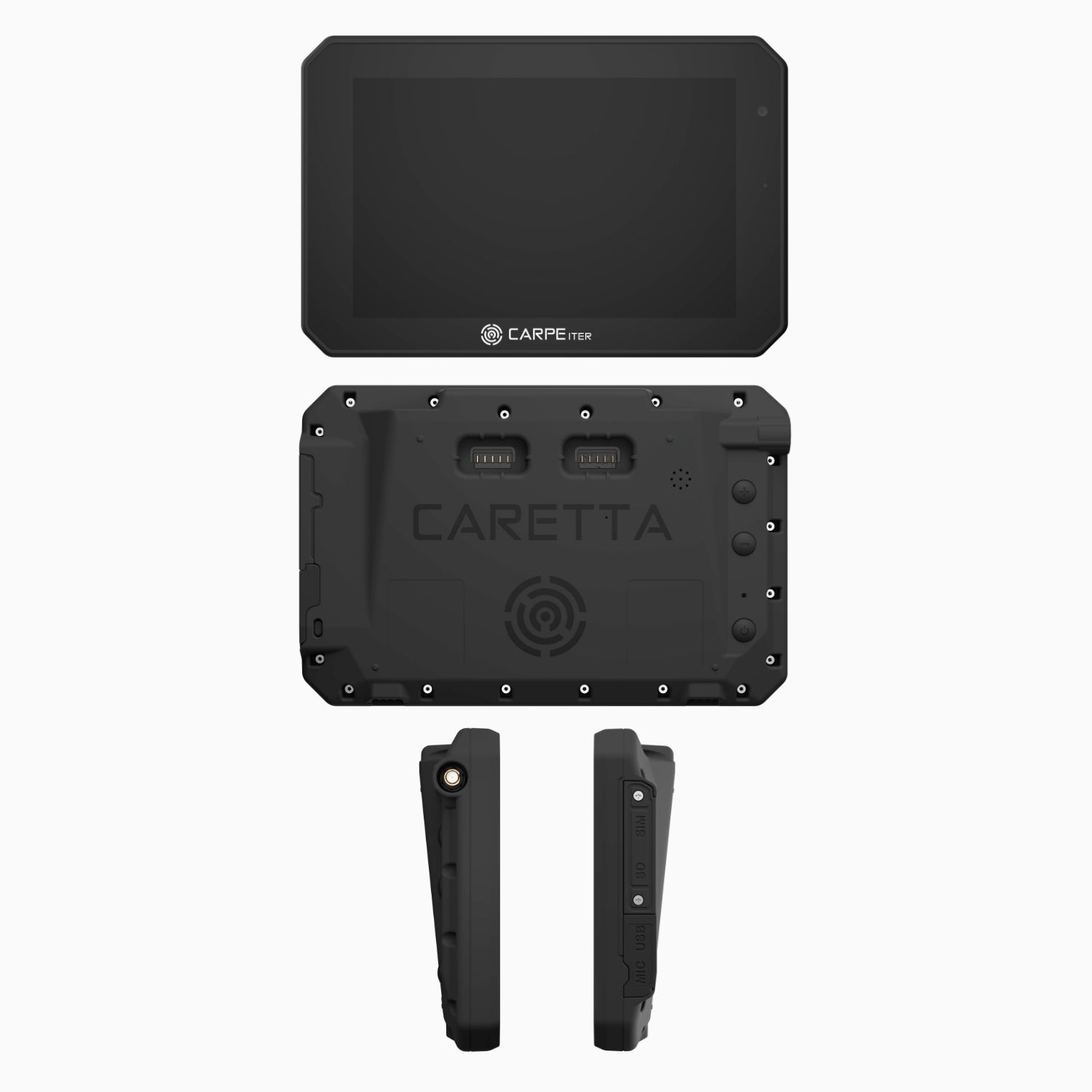
Caretta Description
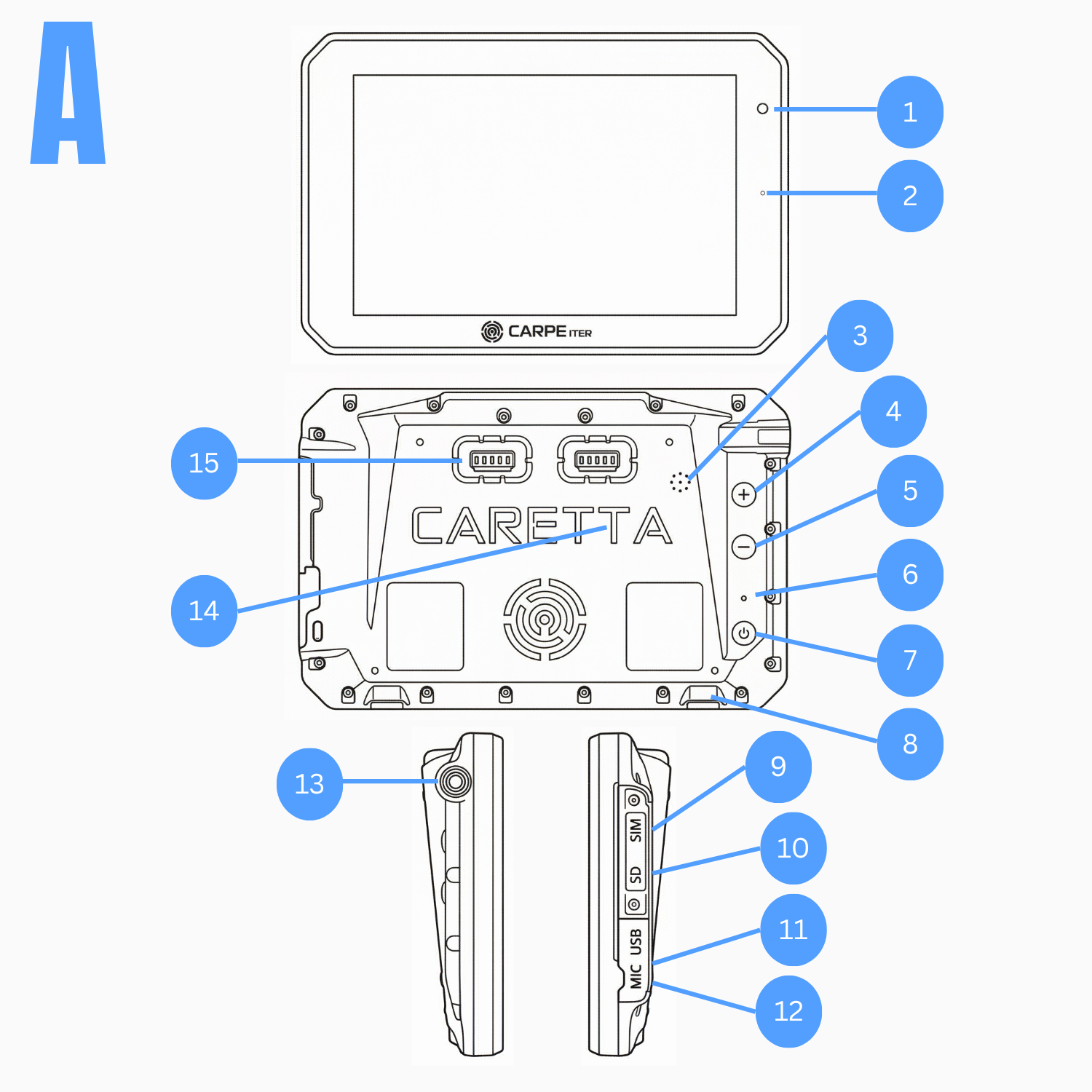
Fig. A:
- Camera
- Status LED
- Speaker
- Volume Up button
- Volume Down button
- Reset button
- Power button
- Locking element
- SIM slot
- SD card slot
- USB connector
- Microphone
- GNSS antenna connector
- Pressure equaliser
- Data/power connector
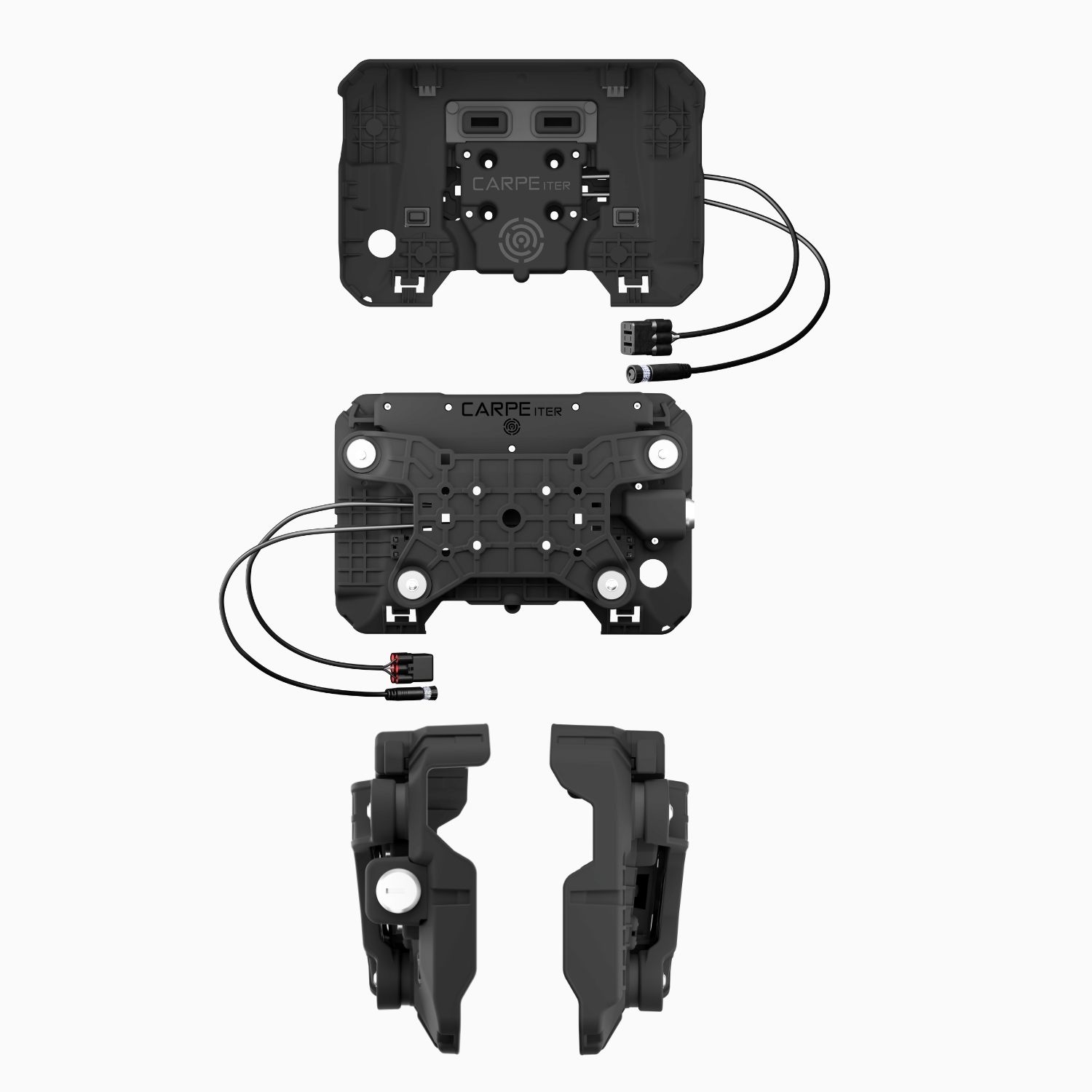
Cradle Description
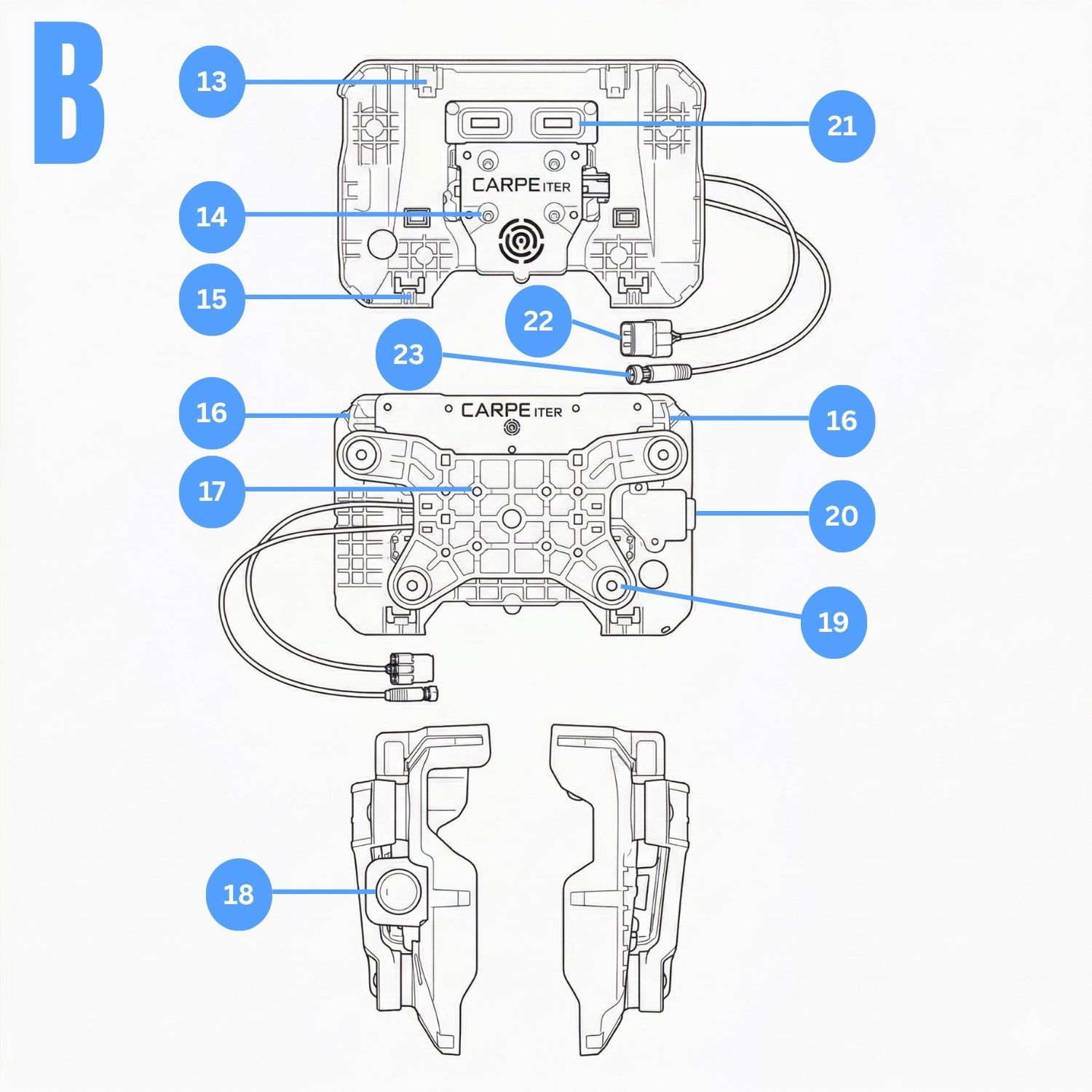
Fig. B:
- Locking mechanism
- Motorcycle mounting holes
- Caretta locking pins
- Ejection handle
- Motorcycle mounting holes
- Lock
- Silentblock
- Lock
- Data/power connector
- OBDII connector
- Carpe Iter accessories connector
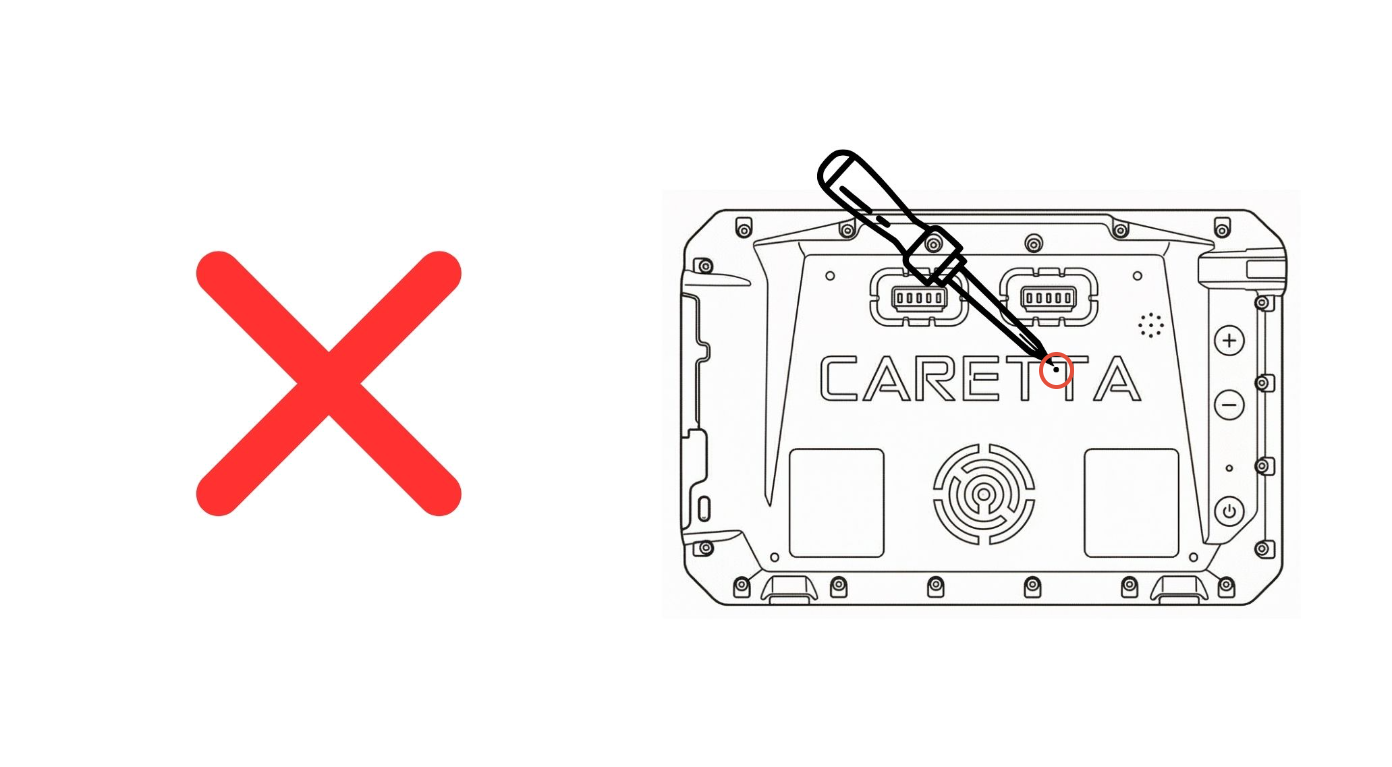
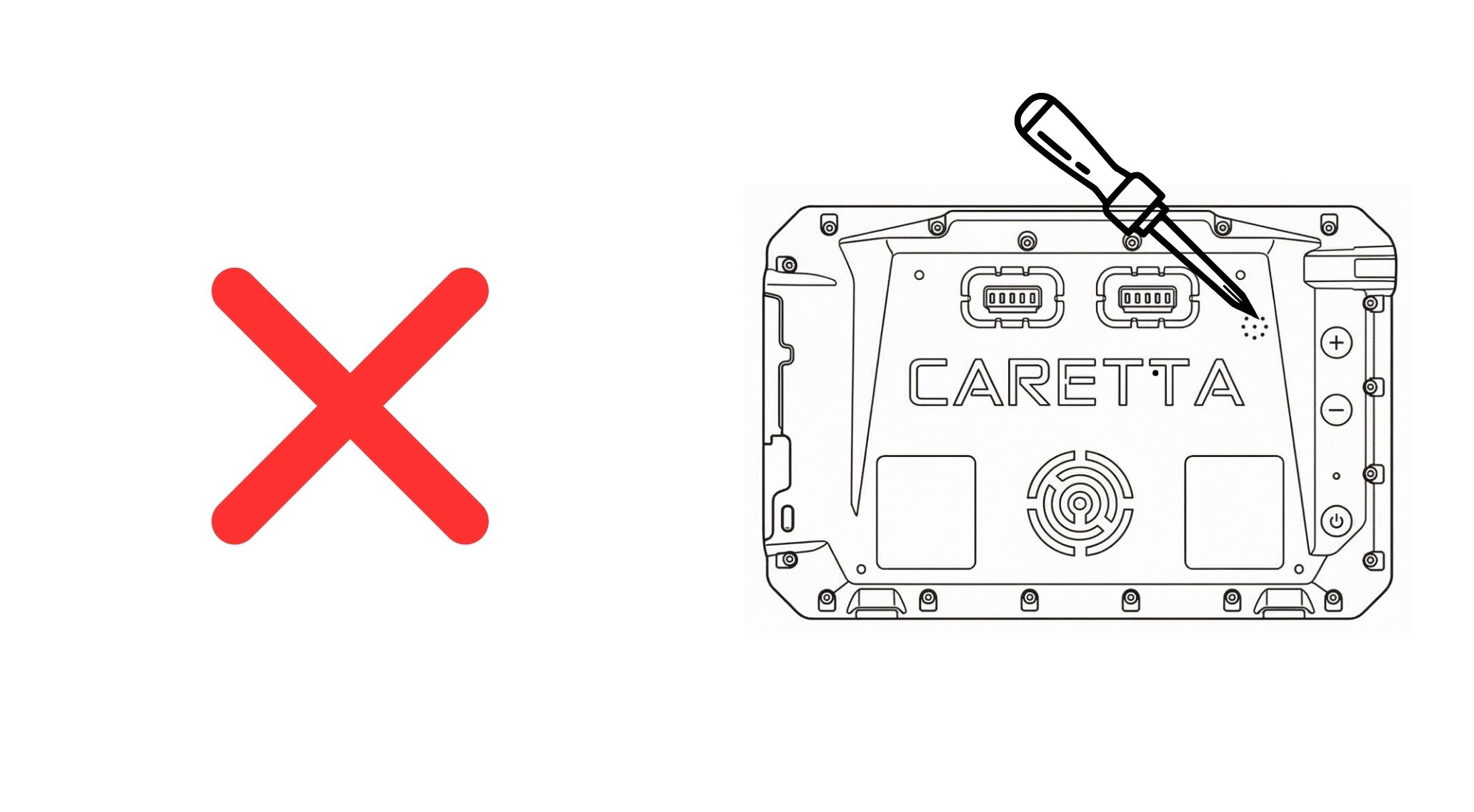
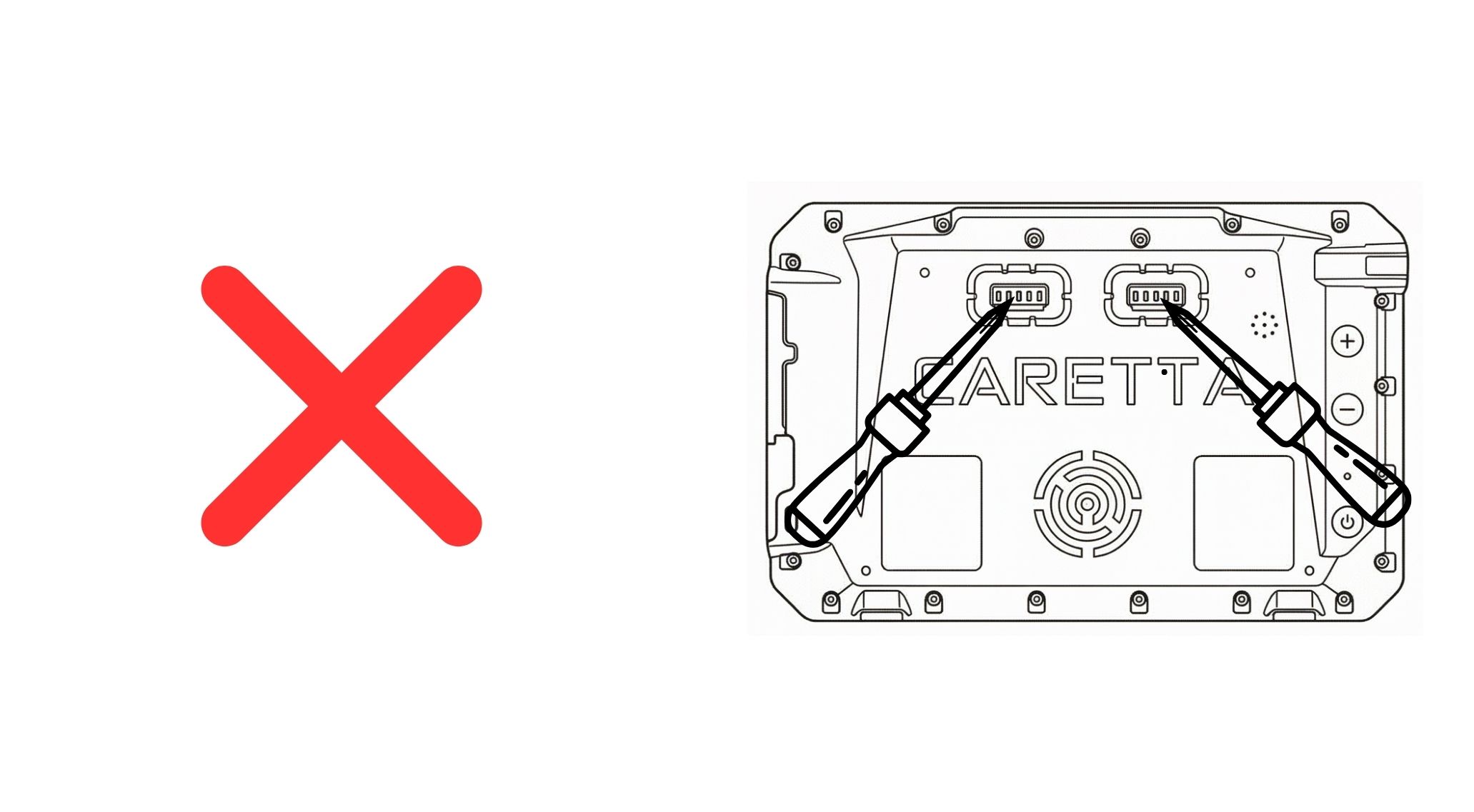
WARNING: Do NOT insert any objects into the Caretta body protrusions.
Quick Start Guide
- Powering on Caretta: Press and hold the power button for 6 seconds.
- Charging via USB: Peel open the USB-C silicone protective cover from the side and connect using the provided USB-C cable to a compatible wall charger, power bank, or computer. Maintain screen brightness below 40% during USB charging.
- Initial Configuration: Follow the on-screen setup wizard upon first device startup.
- Operating System UI: The OS interface is standard Android. Refer to generic Android documentation for standard operating procedures.
- Third-Party Applications: To install additional applications, sign in to your Google Account and download them via the Google Play Store (during the initial setup wizard or subsequently).
- Application Updates: Updating all pre-installed applications via the Google Play Store prior to first use is strongly recommended.
- Cradle Power Delivery: The Cradle supplies power to Caretta when input voltage exceeds 13V (on most motorcycles, this requires starting the engine).
- Charging Indicator: The primary charging indicator is the status LED located on the right side of the screen (see Fig. A, item 2).
SIM and SD Card Installation
- Power off Caretta before inserting or removing a SIM or SD card.
- Remove the SD/SIM slot cover using the provided Phillips screwdriver (refer to Fig. A, items 9 & 10).
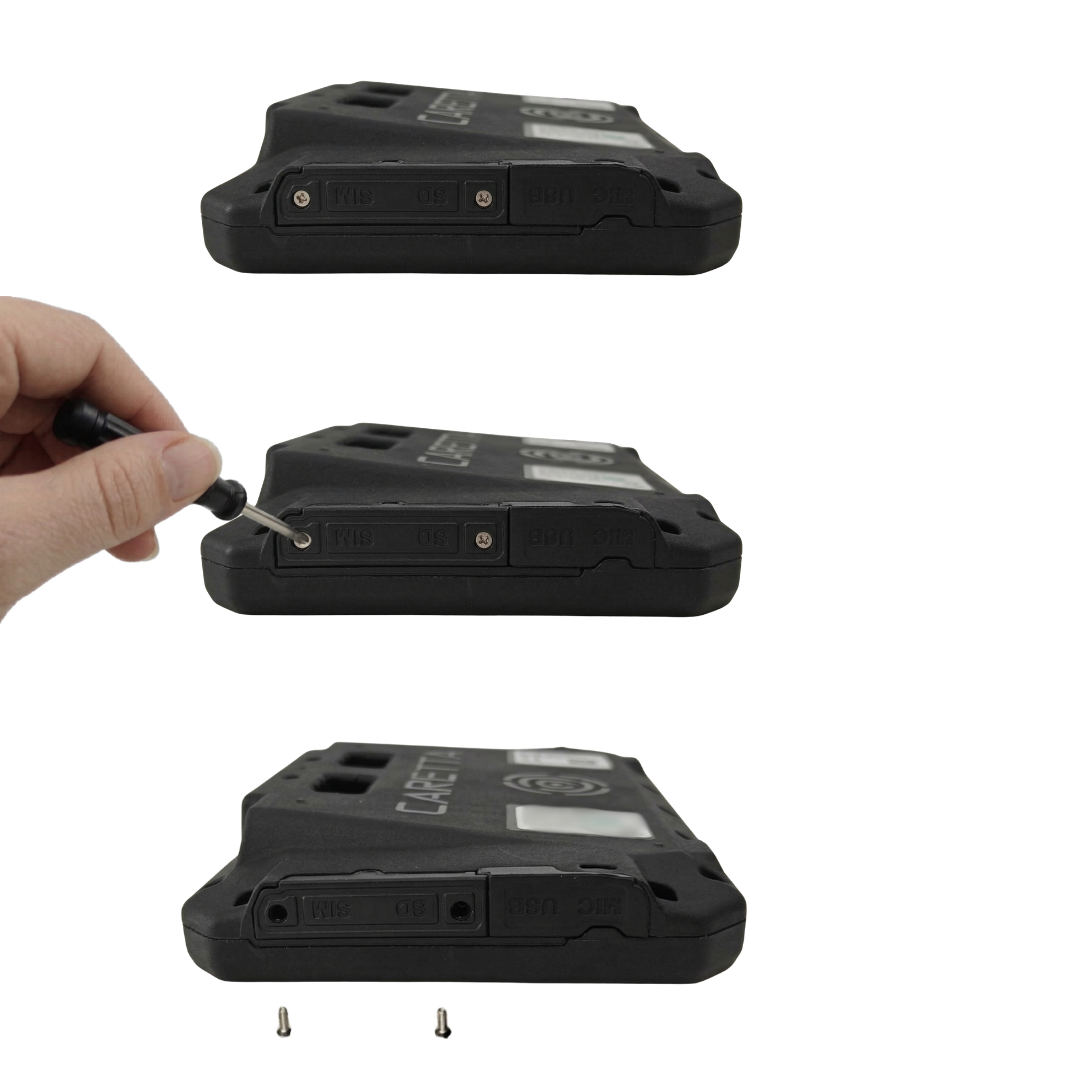
- Use the provided plastic tweezers to insert or remove cards. Do NOT use metal or sharp tools, as this can cause permanent damage to the slots or cards. Ensure proper card orientation.
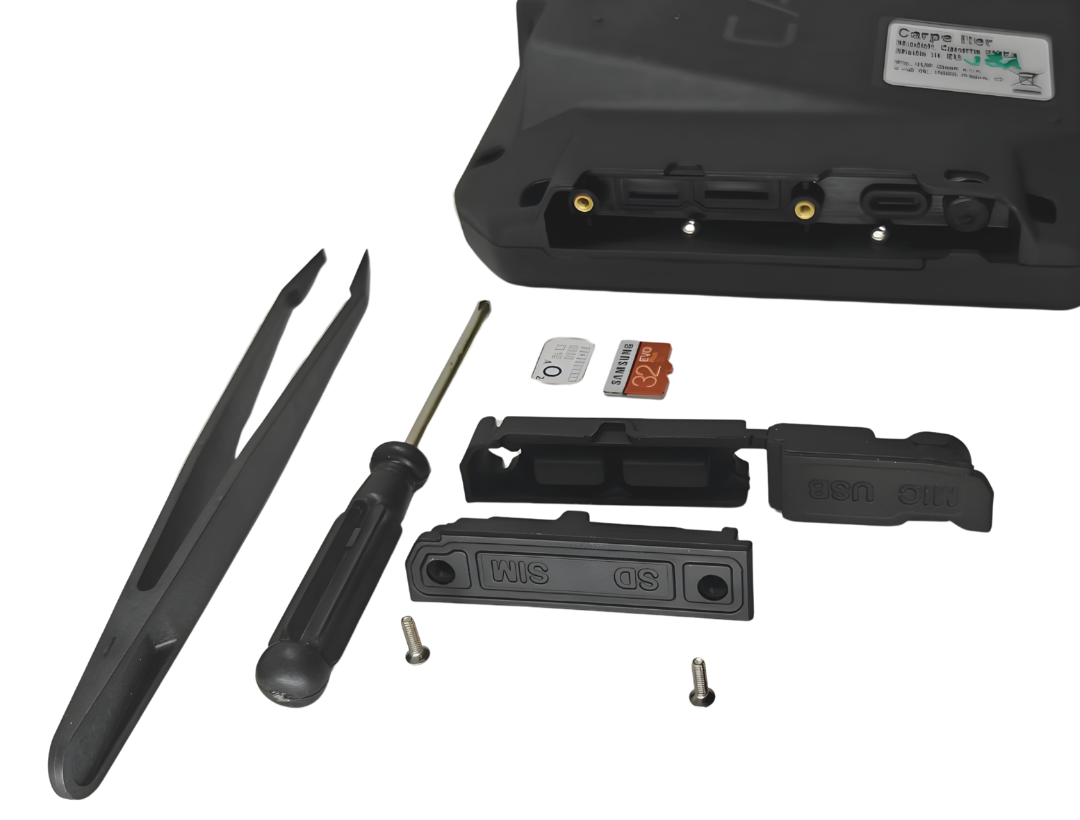
- Press the SIM and SD card in until an audible click confirms engagement.
- If a SIM card is inserted while Caretta is powered on, restart the device to initialize network connectivity.
- Reinstall the slot cover. Ensure the silicone gasket is seated correctly to maintain IP68 ingress protection. Torque screws to a firm stop (do not overtighten).
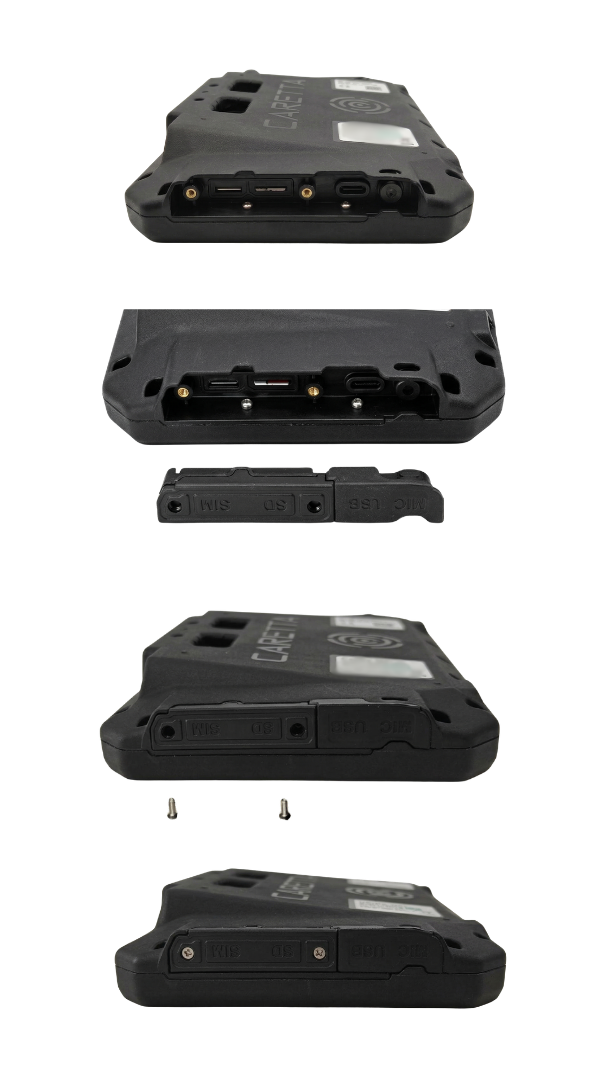
- Supported Formats: Nano SIM and MicroSD.
- eSIM Configuration: Navigate to
Settings > Network & internet > SIMs > Set up an eSIMand scan the operator-provided QR code using the front camera.
Vehicle & Motorcycle Usage
- Caretta must be mounted using the provided or official standalone Carpe Iter Cradle.
- Caretta must only be powered via the Cradle on 12V vehicle electrical systems. Ensure the vehicle supply delivers at least 1.5A @ 12V.
- USB Port Warning: The USB port must not be used for charging while operating vehicles exposed to weather, shock, or continuous vibration.
- Use only the provided power harness or official Carpe Iter adapter cables.
- Power feeds must always be fused. An integrated fuse is included in the power harness. When tapping into auxiliary accessory sockets, verify adequate vehicle-side fuse protection.
- Caretta is not intended for permanent outdoor installation. Dismount Caretta when not in use and store in a dry environment between 10°C and 35°C.
- Ensure battery charge is at least 60% before long-term storage.
- Operate and store the unit strictly within specified temperature and pressure ranges.
- High-Pressure Washing: Do NOT jet-wash Caretta or the Cradle. High-pressure washing causes permanent damage and voids warranty.
- Verify that the cradle blade contacts (Fig. B, item 21) and accessory ports (Fig. B, items 22 & 23) are free of debris before docking.
Mounting Instructions
- The Cradle mounts to a 12mm bar using the included AMPS mounting base (refer to the AMPS base installation guide).
- The Cradle features four M4 threaded mounting points in standard AMPS layout (30 x 38 mm).
- Compatible with third-party mounting systems utilizing M4 fasteners in a 30 x 38 mm AMPS pattern.
- When mounting to flat panels, the included AMPS base (or its sub-sections) functions as a spacer.
- Only use the designated mounting holes (Fig. B, item 17). Do not affix mounting hardware to other protrusions or features.
Docking & Undocking Caretta
Docking (Landscape Orientation)
- Inspect blade connectors (Fig. A, item 15 and Fig. B, item 21) for dust, water, or debris. Clean with a non-conductive brush if required.
- Position Caretta in the lower third of the Cradle at a slight angle resting against the top rim, then slide downward until locator lugs mate.
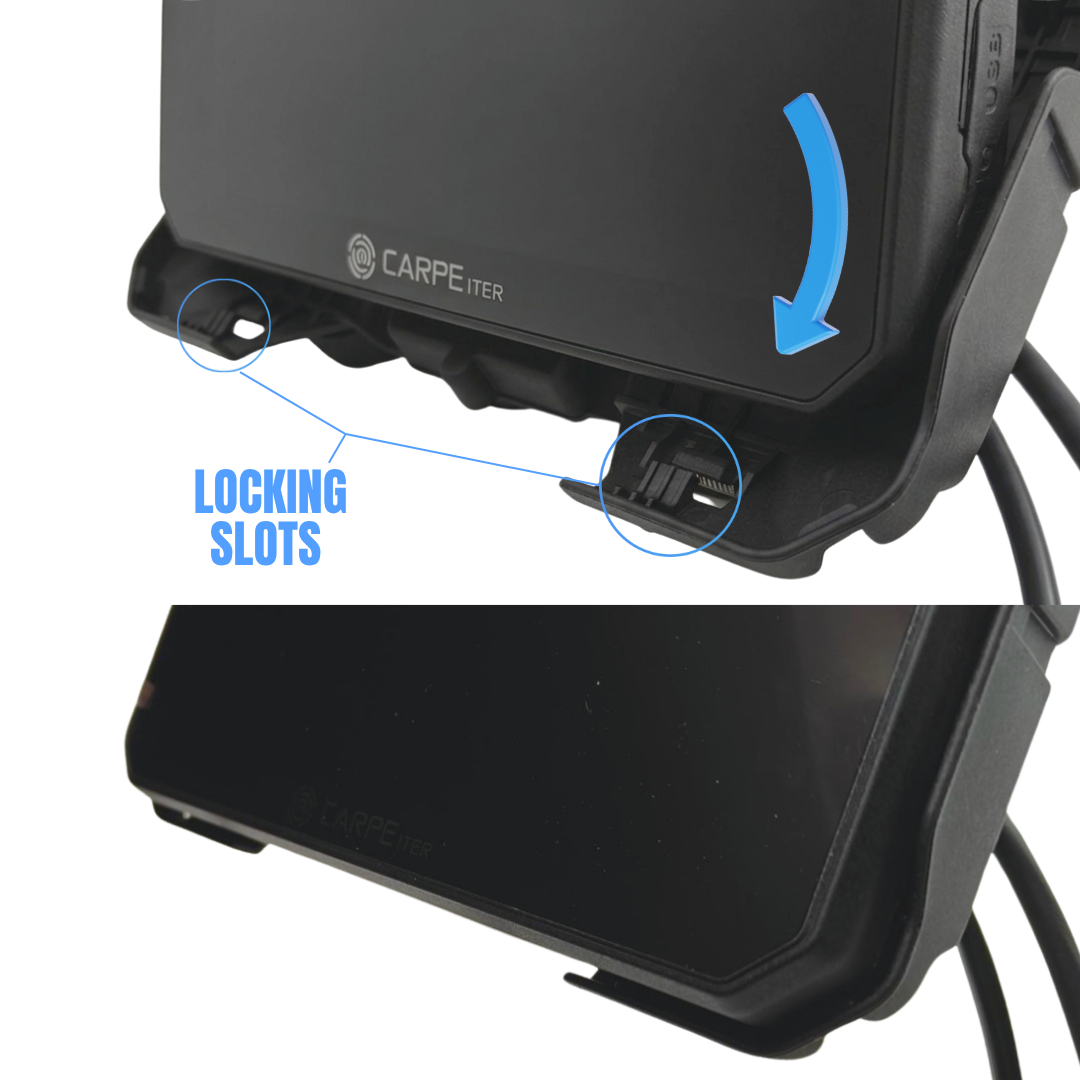
- Press firmly on the top bezel/screen edge until the spring-loaded retention mechanism clicks into place.
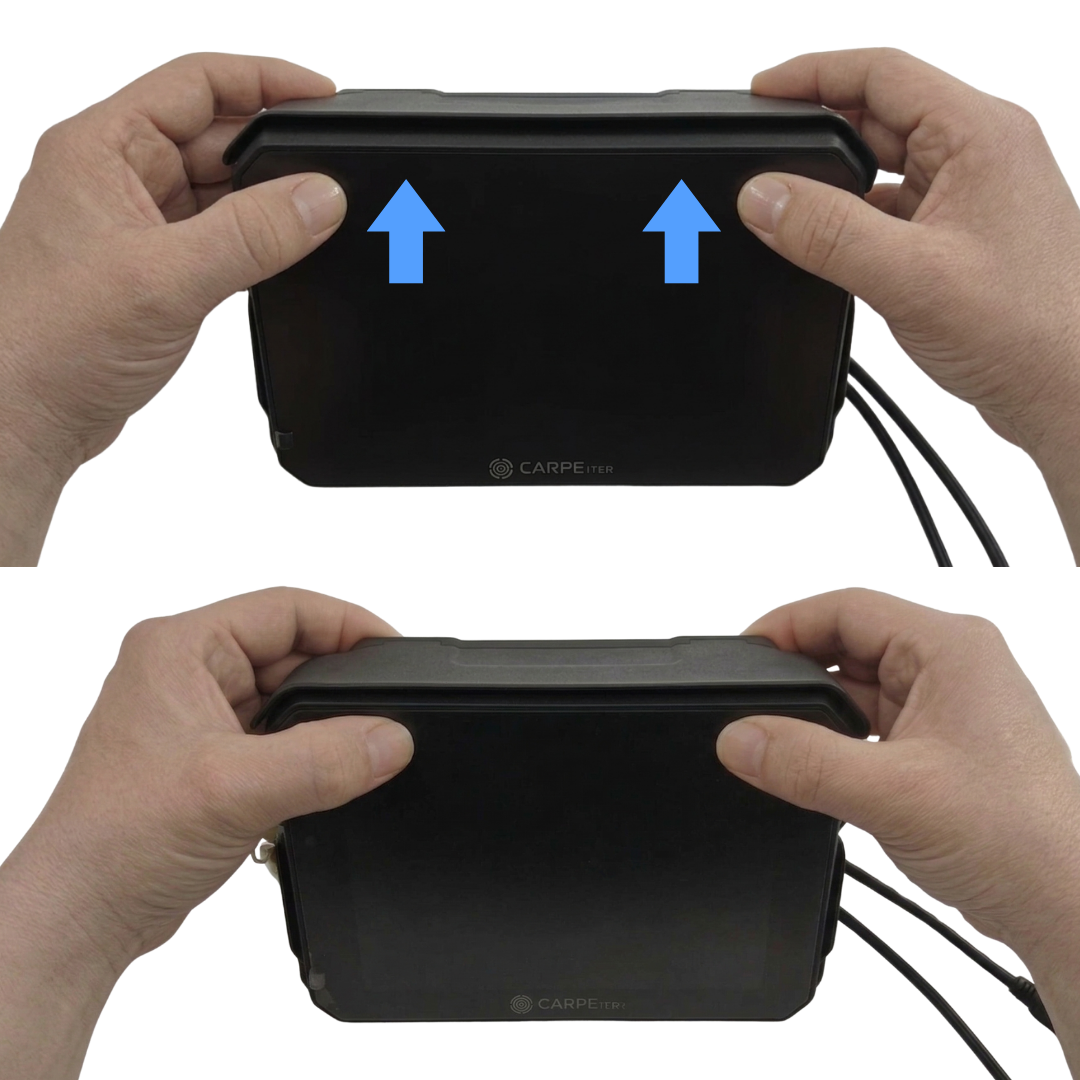
- Confirm that the Ejection Lever (Fig. B, item 16) has fully engaged. Push gently from the left to seat fully. Lock the Cradle key to secure against opportunistic theft. If the key cannot turn, the retention mechanism is not fully locked; re-seat the Ejection Lever from the left.
Undocking
- Unlock the Cradle, support the device with both hands, and push the Ejection Lever (Fig. B, item 16) from the right to release the unit.
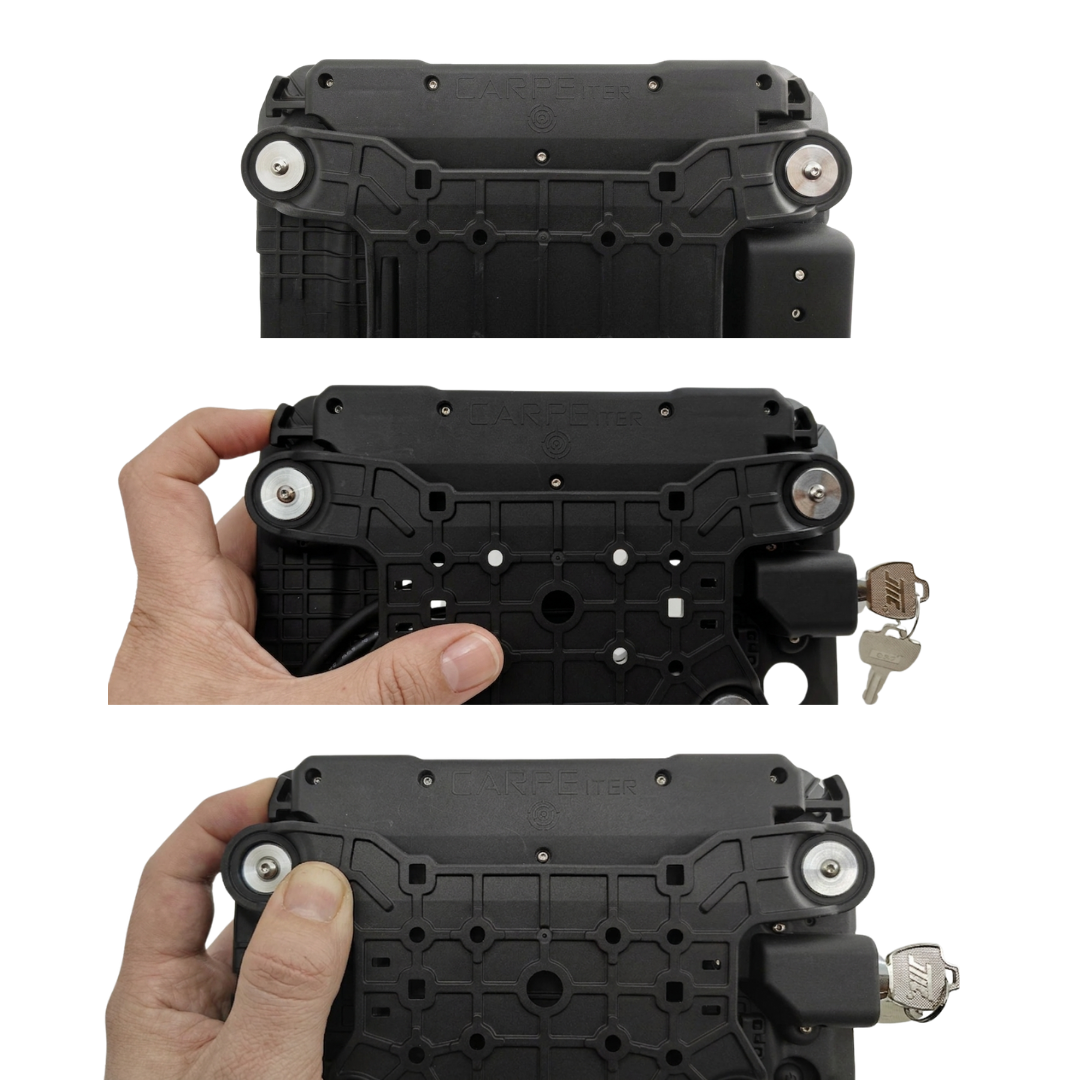
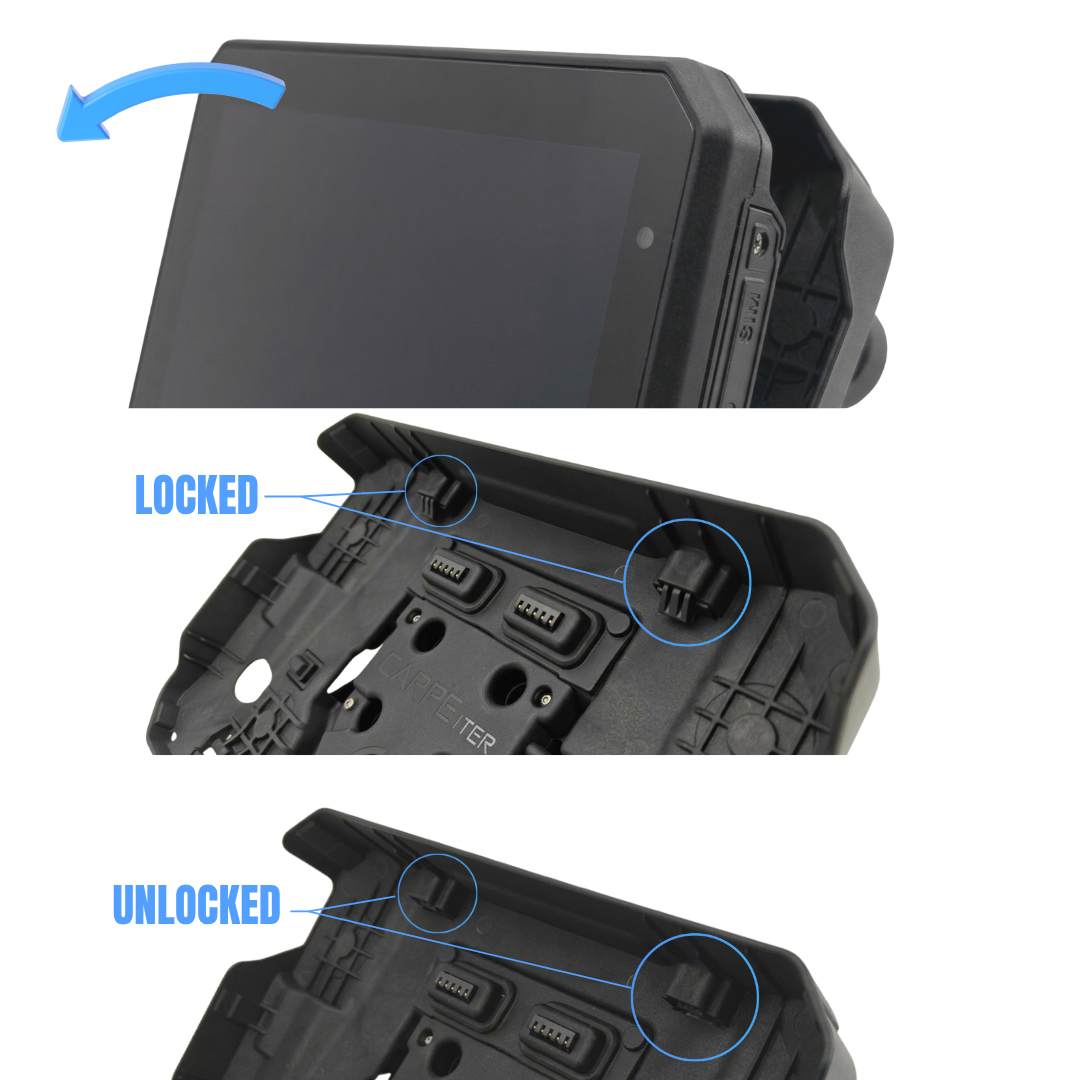
Note: The key lock is an opportunistic anti-theft measure independent of the primary mechanical retention system. The spring retention mechanism holds Caretta firmly in place during riding even when unlocked.
Modifications & Warranty Restrictions
- Modifications to Caretta, the Cradle, ports, or cable assemblies are strictly prohibited and immediately void all warranties.
- Do not disassemble Caretta or the Cradle housing.
- Applying unofficial third-party ROMs or custom operating system modifications voids warranty coverage.
Maintenance
- Caretta and the Cradle do not require scheduled servicing beyond routine contact inspection (Fig. A, item 15 and Fig. B, item 21).
- Clean contact pins and blade connectors with a non-conductive nylon brush after riding in dusty, sandy, or muddy conditions.
- If contact points exhibit discoloration or oxidation, treat with dedicated electrical contact cleaner spray and apply a light coating of dielectric contact grease.
Disclaimer & Safety Notices
- Unless explicitly certified, items are not homologated for public road traffic compliance across all individual jurisdictions. Users are responsible for adhering to local transport regulations.
- Position brackets and hardware so sharp edges do not face the rider. Dismount empty brackets when not in use.
- Carpe Iter is not liable for personal injury or gear damage resulting from vehicular incidents or improper mounting.
- User documentation and technical support are provided electronically in English only.
- Installation assumes basic mechanical aptitude. If uncertain, have hardware installed by a qualified motorcycle service workshop.
Warranty Coverage
Carpe Iter provides a limited direct manufacturer's warranty for Caretta and the Cradle. This warranty is transferable across subsequent owners and applies globally.
Notice: Carpe Iter reserves the right to decline warranty claims resulting from user failure to install mandatory OS and firmware updates when prompted.
Specifications
Core Performance & OS
- Operating System: Android 14 with Google Play Store compatibility
- Processor: 8-core Qualcomm Kryo CPU with Adreno 610 GPU
- Memory: 8GB RAM
- Storage: 128GB Internal Storage (expandable via MicroSD up to 512GB)
Display & Construction
- Screen: 7-inch display, 1920 × 1200 resolution
- Brightness: 2,200+ nits
- Touchscreen: All-weather, glove-friendly capacitive touch
- Screen Protection: Pre-installed tempered glass with anti-reflective and oleophobic coating
- Environmental Rating: IP68 (Do NOT pressure wash)
- Operating Temperature: -20°C to 75°C
GNSS / GPS & Navigation
- Hardware: Dedicated dual-band GNSS chip (L1+L5), up to 10Hz update rate, sub-1m accuracy
- Constellations: GPS, Galileo, GLONASS, BeiDou, QZSS, SBAS
- External Antenna: SMA Female port for active dual-band antenna (3–5V). Use only approved Carpe Iter antenna models to prevent circuit damage.
Connectivity & Sensors
- Cellular: LTE (EMEA region) supporting VoLTE and 4G data (including bands B20 and B28)
- SIM: Dual SIM (eSIM + Nano SIM)
- Wi-Fi: Dual-band 2.4 GHz / 5 GHz (802.11 a/b/g/n/ac)
- Bluetooth: 5.1 (Classic & BLE)
- Sensors: Ambient light sensor, accelerometer, magnetic compass (gravimeter), gyroscope
Ports & Audio
- Battery: 5200 mAh Li-ion
- Power Management: Direct 12V input with surge protection and battery-bypass thermal mode
- Ports: IP68 USB-C 3.1 with OTG support; proprietary heavy-duty blade contacts for Cradle docking
- Audio / Video: Front-facing camera; IP68 waterproof microphone and loudspeaker
Power Input
- USB Charging: 5V QC/PD compatible (10W minimum charge; 15W required for continuous operation at full brightness). Device charges with screen off or brightness below 80%.
- Blade Contacts (via Cradle): 12–14.5 VDC nominal (20W / approx. 1.5A @ 12V for continuous operation at full brightness). Power delivery activates upon engine startup.
Mechanical Specifications
- Caretta Weight: 630 g
- Cradle Weight: 390 g
- Caretta Dimensions (L × W × H): 194 × 129 × 22–33 mm (triangular cross-section)
- Cradle Dimensions (L × W × H): 203 × 165 × 50–56 mm (triangular cross-section)
Was this article helpful?
That’s Great!
Thank you for your feedback
Sorry! We couldn't be helpful
Thank you for your feedback
Feedback sent
We appreciate your effort and will try to fix the article