

v1.3
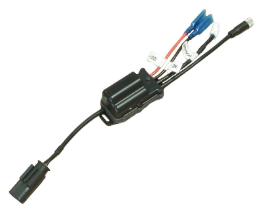
Applicable Model: BCMDC0081
1. Description
1.1. Overview
BMW Control (BCMD) is a Bluetooth Low Energy remote controller designed specifically for BMW Motorrad motorcycles in the "GS" lineup (subject to model limitations stated below). The controller cannot be used on any other motorcycle models or brands. Please refer to the product description for the full list of compatible BMW models.
1.2. Compatible Host Devices
BCMD is designed to connect to Android-powered smart devices (smartphones, tablets, and Carpe Iter Pad).
1.3. Prerequisites for BMW Motorcycle Compatibility
Please refer to the product description for a specific list of compatible BMW models. General prerequisites include:
- Manufacturing year 2013 or newer.
- Motorcycle is equipped with the factory BMW Multi-Controller (Wonderwheel).
- "Navigation" option is enabled in the motorcycle firmware. All Adventure models usually have this option enabled by default. If the navigation option is not enabled on your motorcycle, visit an authorized BMW dealer to unlock this feature.
1.4. Kit Contents
The BCMD kit comprises the following main components:
- BMW Control Hub
- BMW Control Buttons
1.5. Standalone Hub Operation
The BMW Control Hub can be used standalone without the BMW Control Buttons. In this configuration, control functionality is limited to 6 function controls (short + long press) via the factory BMW Multi-Controller. When combined with the BMW Control Buttons, the system provides 14 function controls (short + long press).
1.6. Button Module Requirement
The BMW Control Buttons have no standalone functionality and must be connected to the BCMD Control Hub.
1.7. Component Overview
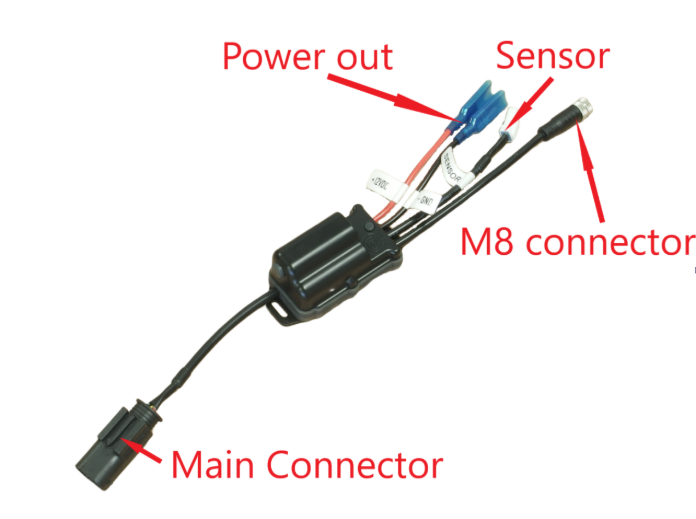
1.8. Button Mapping
An overview of default functions assigned to individual inputs is detailed on the NGH - Controller configuration page.
2. Installation
2.1. BMW Control Hub (BCMD Hub)
Important: Disable Clock and Date synchronization with GPS in your motorcycle's instrument cluster settings. Otherwise, the time and date settings will be overridden whenever the BCMD Hub connects (and each time the motorcycle is started).
Mate the Main Connector with the factory connector intended for the BMW Navigator Mount Cradle. Consult your motorcycle's user manual for the exact connector location. On recent motorcycles, this connector is located on the right side of the front fairing subframe:
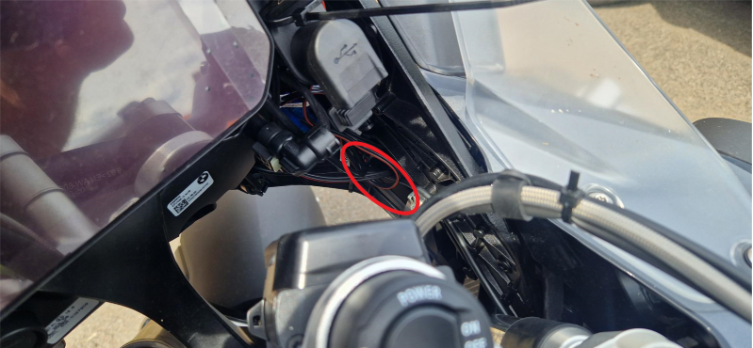
On older models, the connector is located at the front beneath the motorcycle dashboard.
Safety Warning: Secure the BCMD Hub and all attached wiring to the front fairing subframe using zip-ties. Ensure the BCMD Hub and wiring do not obstruct the free movement of the steering assembly at full lock. Obstructed steering while riding can cause severe or fatal accidents.
2.2. BMW Control Buttons
The BMW Control Buttons mount directly on top of the stock e-throttle grip assembly. They are precision-molded to the shape of the factory throttle housing and are compatible with specific BMW models (generally all models in the GS lineup, with the exception of BMW F900GS MY26; previous model years remain compatible). The design integrates seamlessly with factory controls in a plug-and-play configuration without requiring component relocation.
2.3. Power Outlet
The BCMD Hub includes an auxiliary power outlet for powering accessories on your motorcycle.
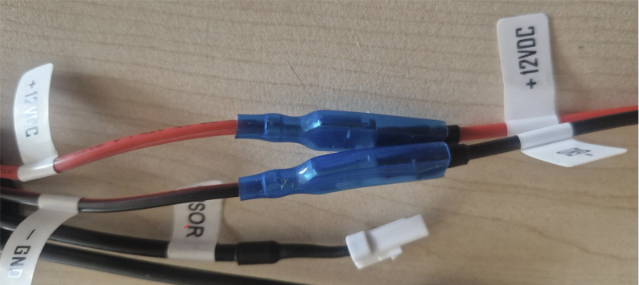
- The power outlet connectors mate with Carpe Iter proprietary power accessories, but can also power any third-party device requiring 12V DC input.
- Ensure the terminal connectors on the power outlet never touch, as this will cause a short circuit. Ensure the pre-installed silicone insulating sleeves fully cover the connectors once your accessory is attached:
- The auxiliary power outlet on the BCMD Hub is subject to the same current limits as the stock BMW Navigator Cradle socket. Consult your motorcycle's user manual to verify maximum allowable current draw.
2.4. Front Wheel Sensor (Optional)
If you choose to use the BCMD Hub magnetic sensor reading capability, connect a standard 2-wire magnetic reed switch to the connector marked SENSOR. Connecting the sensor is only required if you plan to read front wheel revolutions; it is not required for normal BCMD operation. The SENSOR connection is polarity-independent.
Warning: DO NOT connect the SENSOR input to the factory OEM front wheel speed sensor on your motorcycle. Differing signal and voltage levels can permanently damage the BCMD Hub or motorcycle electronics. Except for the Main Connector, the BCMD Hub MUST NOT be connected to the motorcycle electrical system via the SENSOR port.
The SENSOR lead uses a 3-wire connector. To connect standard aftermarket magnetic reed switches, use the Carpe Iter adapter cable (sold separately, color code: red-black-yellow):
- Connect the reed switch across the black and yellow wires.
- Leave the red wire disconnected; fold and insulate it securely (e.g., using electrical tape).
- Reed switches are polarity-independent.
Note: Do not cut off the stock connector on the SENSOR input cable, as doing so will eliminate compatibility with upcoming Carpe Iter Hall-effect sensors.
3. Operation & Use
3.1. Bluetooth Pairing
BCMD requires pairing and bonding with an Android-powered host device (smartphone, tablet, or Caretta). For detailed pairing steps, refer to our guide: How to connect Carpe Iter remote controller.
3.2. Companion App Setup
For full functionality, installation of the companion application—NGH (Next-Gen HUD)—is required. For complete setup details, refer to: NGH support articles.
3.3. BMW Multi-Controller Activation
BCMD enables the BMW Multi-Controller on Android devices similarly to its operation with the original BMW Navigator IV and V systems.
- TFT Displays: Activate "Nav" mode by long-pressing UP on the Menu toggle switch:
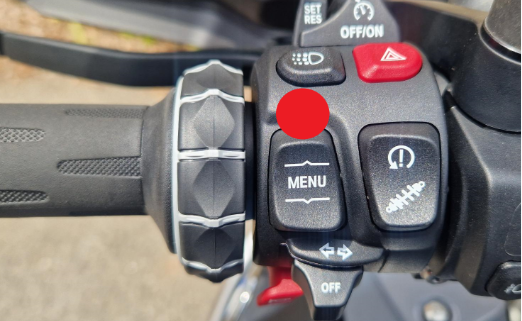
- Non-TFT Displays: No manual activation is required; Multi-Controller inputs are active immediately.
3.4. Automatic Reconnection
Once bonded, BCMD connects automatically when powered on and within Bluetooth range of your Android device.
3.5. Unpairing
To permanently disconnect BCMD from your Android device, unpair/forget the device in your Android Bluetooth settings.
3.6. LED Status Indicators
- Power On / Active Mode: Any LED illumination confirms the BCMD Hub is powered. A periodic blue blink indicates active operation.
- Rapid Blue Flashing: Device is in pairing/advertising mode.
- Steady Blue LED: Successful Bluetooth connection to a bonded device; ready for normal operation.
4. Operating Considerations

- Never exceed the operating parameters stated in Section 5, or damage to the BCMD Hub may occur.
- Ensure correct polarity of input leads (no checks needed if using unmodified stock motorcycle connectors).
- Do not pull or place mechanical tension on cables and wires.
- Overheating: Exceeding maximum operating temperatures will trigger thermal protection. The BCMD Hub will resume normal operation once cooled (provided thermal limits did not cause permanent component damage).
- High-Pressure Washing: DO NOT direct high-pressure water jets (e.g., pressure washers) at the BCMD Hub or Button assembly.
- Button Combinations: Do not press multiple buttons simultaneously during normal operation, as this may cause unpredictable behavior.
5. Specifications
 Operating Voltage: 10–16V DC
- Average Power Consumption: 5mA @ 12V (Bluetooth connected, Wheel Sensor active)
- Auxiliary Power Backup: Onboard supercapacitors provide up to 30 minutes of standalone operation for the BMW Control Buttons when fully charged. (Note: The BMW Multi-Controller requires motorcycle ignition to be ON).
- Environmental Ingress: Dust- and water-resistant for all motorcycle operating conditions.
- Operating Temperature: -15°C to 60°C (includes solar/external radiant heat).
- Storage Temperature: -15°C to 60°C.
- Operating Humidity: 0–95% RH.
- Storage Humidity: 0–70% RH.
- Control Elements:
- BMW Control Hub: None
- BMW Control Buttons: 4x mechanical pushbuttons
- Button Actuation Force: Nominal: 0.5 kgf | Maximum rated: 2.0 kgf
- Status Indicator: 1x RGB LED on BMW Control Hub
- Maximum SENSOR Frequency: 40 Hz (>300 km/h with 21-inch wheel, subject to reed switch specification).
- Radio / Bluetooth:
- Operating Frequency: 2.402 – 2.480 GHz
- Modulation: Wideband
- Compliance: Bluetooth 5.0
- TX Power: < 10 dBm EIRP
- Connectors (BMW Control Hub):
- 6.3mm Faston female (Power output)
- JST 03R-JWPF-VSLE style (SENSOR input)
- M8 8-pin connector (BMW Control Buttons)
- RF Safety Distance: Device is not intended for body-worn operation. Maintain minimum 40 cm separation distance.
- Dimensions:
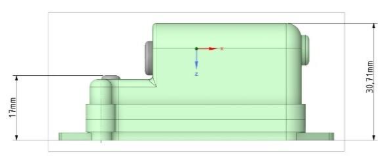
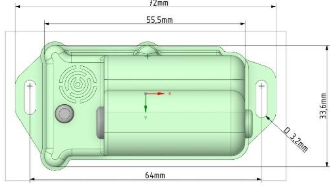
- BMW Control Hub (W x L x H): 33.6 x 55.5 x 31 mm (excluding cables)
6. Disclaimer

- Unless explicitly stated for a specific Carpe Iter item (BCMD Hub, CI Pad, Holder, brackets, and accessories), no homologation procedures have been performed for public road traffic compliance. Use at your own risk.
- Ensure items with sharp edges are positioned away from the rider. Always dismount unused brackets or empty holders.
- Improperly secured items or severe vehicle impacts may cause personal injury or property damage.
- Manuals and operating instructions are provided exclusively in electronic format online.
- Installation assumes standard familiarity with smart devices and basic mechanical dexterity. When in doubt, have installation completed by a specialized motorcycle workshop.
- Documentation and technical support are provided exclusively in English.
7. Warranty
- Carpe Iter provides a worldwide warranty covering defects present upon delivery: 2 years for consumer purchases and 1 year for commercial/business purchases (calculated from dispatch date). Software and batteries are excluded from standard terms.
- Batteries carry a 6-month limited warranty guaranteeing retention of at least 60% nominal capacity when used according to instructions.
- Warranty covers functional defects preventing normal operation. Cosmetic issues (discoloration, paint wear, superficial oxidation) are excluded.
- Warranty is conditional upon adherence to official product manuals and operating guidelines. Defects resulting from misuse, lack of maintenance, or normal wear and tear are excluded.
- Software is provided as-is without warranty.
- Damage caused by external forces (abrasion, impact, submersion, vibration, excessive pressure, UV exposure) is not covered.
- Plastic and rubber components are expendable materials subject to normal wear.
- Claimed items must be delivered to our designated facility along with a written defect description. Shipping, customs, and re-import fees are the responsibility of the claimant.
- Warranty claims may be resolved at Carpe Iter's discretion by repair, monetary compensation, or product replacement.
- Carpe Iter reserves the right to replace defective items with equivalent or newer-generation models.
- Warranty claims are processed within 30 days of physical delivery to our service address.
- Important: Always open a ticket via our Support Portal before returning any hardware, as many issues can be resolved remotely without physical return.
Was this article helpful?
That’s Great!
Thank you for your feedback
Sorry! We couldn't be helpful
Thank you for your feedback
Feedback sent
We appreciate your effort and will try to fix the article